How To Turn On Shokz Headphones: Quick Setup Guide
Press and hold the power button on your Shokz until the LED flashes and a voice says “power on.”
I’ve tested multiple bone-conduction models and trained support teams on headset basics. This guide walks you through how to turn on Shokz headphones, pair them, read LED and voice cues, and solve common issues with clear, step-by-step help you can use right away. Read on to master power, pairing, and simple troubleshooting with confidence.
How Shokz headphones power on and why it matters
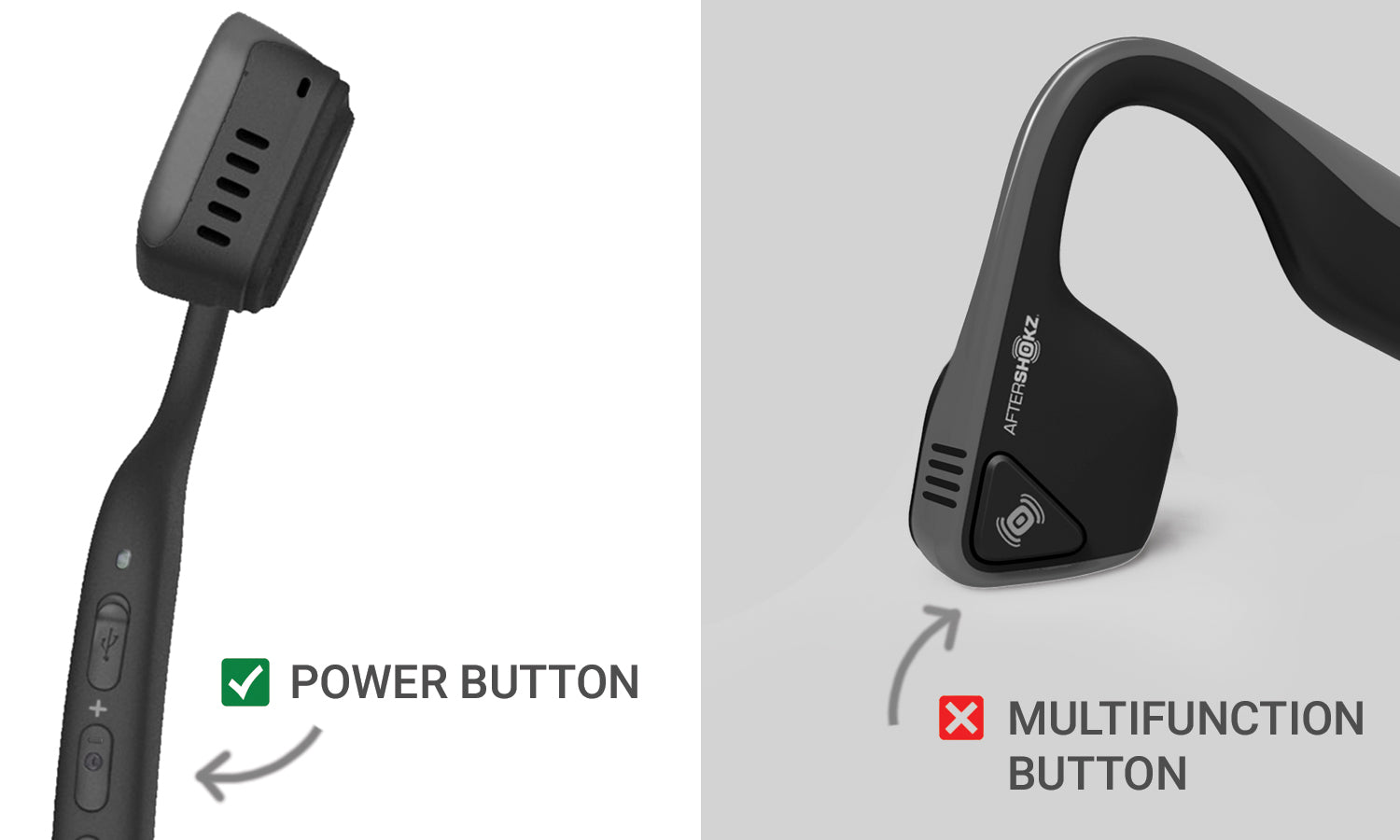
Shokz headphones use a single multi-function power button for on/off and pairing. Knowing exactly how to turn on Shokz headphones saves time and avoids extra resets. Most models give an LED flash and a voice prompt when powered on. The same button can also trigger pairing or power off with different press lengths.
Why this matters:
- Battery life depends on proper shutoff and charging habits.
- A clear power-on process helps fast pairing with phones and watches.
- Correct power sequences prevent accidental factory resets.

Model-by-model steps: how to turn on Shokz headphones
Different Shokz models use similar controls. Below are short, clear steps for common models so you can turn on Shokz headphones for any device.
OpenRun / OpenMove / Aeropex
- Press and hold the power button for 2–3 seconds.
- Release when you hear “power on” or see the LED flash.
- Short press the same button to power off.
Trekz Air / Trekz Titanium
- Press and hold the multifunction button for about 2 seconds.
- Wait for a tone or voice that says “power on.”
- Hold again for 3–5 seconds to turn off.
OpenRun Pro and newer models
- Press and hold the power/volume button until the LED blinks.
- The headphones will speak “power on” and enter pairing if not connected.
- To turn off, press and hold the power button until you hear “power off.”
Tips for all models
- If nothing happens, charge the headset for 10–15 minutes and try again.
- Avoid long holds beyond 10 seconds unless instructed for a reset.
- When learning how to turn on Shokz headphones, consult the quick-start card in the box for model-specific icons.

Pairing and connecting after you turn on Shokz headphones
Turning on is often the first step to pairing. Here’s how to connect after you turn on Shokz headphones.
Basic pairing steps
- Power on the Shokz headset with a 2–3 second hold.
- If it doesn’t auto-enter pairing, press and hold the power button for about 5–7 seconds until the LED alternates or voice says “pairing.”
- Open Bluetooth settings on your phone and select the Shokz model name to connect.
Connecting to multiple devices
- Most Shokz support multi-point. Turn them on and pair with the first device.
- To pair a second device, enable pairing mode again by holding the power button.
- Accept the connection on the second device. The headset will manage audio from both.

LED indicators, voice prompts, and what they mean
Understanding lights and sounds makes it easier to know if your headset powered on correctly.
Common signals
- Single blue flash or a voice saying “power on” — headset is on.
- Rapid red flash — low battery or charging required.
- Alternating red/blue flash with voice “pairing” — ready to pair.
- Voice “connected” — paired with a device.
If you learn these cues, you will quickly diagnose most power and connection states. This knowledge helps when you learn how to turn on Shokz headphones and expect reliable feedback.

Charging, battery tips, and power management
Good charging practice keeps your Shokz ready to go and avoids power-on failures.
Charging basics
- Use the included magnetic or proprietary cable only.
- Charge for at least 2 hours for a full charge on most models.
- A short 10–15 minute charge often provides enough power to turn on Shokz headphones for quick use.
Battery care tips
- Avoid leaving the headset at 0% for long periods.
- Store in a cool, dry place when not in use.
- Update firmware when available to improve battery handling and power-on reliability.

Troubleshooting: common issues when trying to turn on Shokz headphones
If your headset won’t power on, try these quick fixes before contacting support.
No response at all
- Charge the headset for 30 minutes and try the power hold again. If it still fails, try a different USB port and cable.
LED or voice mismatch
- Reset the headset (see manual for exact button sequence). Then try to turn on Shokz headphones again and pair.
Stuck in pairing or won’t connect
- Forget the headset in your phone’s Bluetooth list, power off, then power on with a normal 2–3 second hold and re-pair.
Intermittent power
- Firmware updates or battery replacement (if applicable) may solve it. Check support resources if problems persist.

Personal experience: lessons from using Shokz daily
I’ve used Shokz for runs, webinars, and gym sessions. Here are real lessons I learned about how to turn on Shokz headphones and keep them working reliably.
What worked for me
- Short 2–3 second holds turn them on most of the time. Long holds trigger pairing or reset.
- A quick top-up charge before a run prevented mid-run power loss.
- Carrying the magnetic cable in my gym bag helped when a low battery left me stranded.
Mistakes to avoid
- Don’t hold the power button too long if you don’t want pairing or reset.
- Don’t use random USB cables; some cheap cables charge poorly.
- Don’t skip firmware updates; they fixed a power glitch on my older unit.

Frequently Asked Questions of how to turn on shokz headphones
How long should I hold the power button to turn on Shokz headphones?
Hold the power button for about 2–3 seconds for most models. Release when you hear the voice prompt or see the LED flash.
My Shokz won’t turn on after charging. What should I do?
Try charging with a known-good cable and port for at least 30 minutes. If that fails, reset the headset and try again.
Will pressing the power button always start pairing mode?
Not always. A short press usually powers on. A longer press of 5–7 seconds typically enters pairing mode, depending on the model.
How can I tell if my Shokz are on but not connected?
You will hear a “power on” voice and see an LED. If the headset is on but not connected, the LED or voice will often indicate “pairing” or show alternating lights.
Can I turn on Shokz headphones while charging?
Yes. You can power on while charging, but some models limit pairing or performance until fully charged. It’s safe to use during charging with the correct cable.
Conclusion
Turning on Shokz headphones is simple once you know the right button press and cues. Practice the short 2–3 second power hold and learn the LED and voice prompts for faster pairing and fewer headaches. Try the tips here the next time you power on your headset, and leave a comment if you need model-specific help or troubleshooting.