How To Charge JBL Headphones: Quick Charging Guide
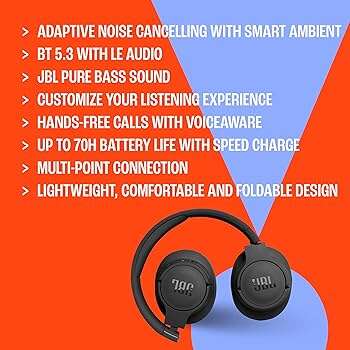
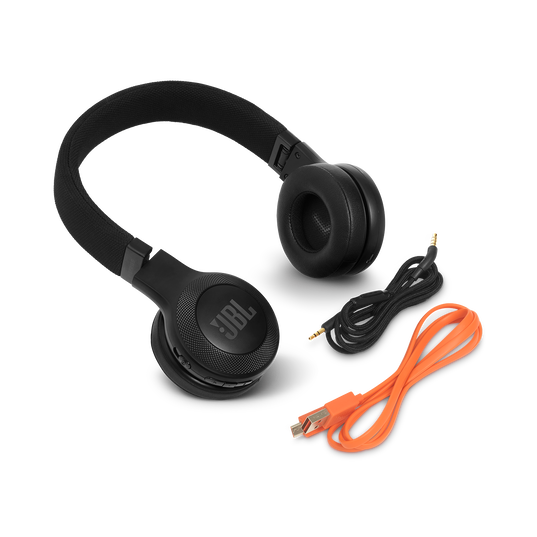
Charge JBL headphones with the supplied USB cable or charging case until the LED indicates full.
I’ve spent years testing audio gear and helping people fix common issues. This guide shows exactly how to charge JBL headphones safely and efficiently, whether you have over-ear cans, on-ear models, or true wireless earbuds. Read on for step-by-step directions, troubleshooting tips, battery care, and real-world advice that saves time and keeps your JBL headphones powered longer.
Why proper charging matters for JBL headphones
Using the right charging method affects battery life and safety. JBL headphones use lithium-ion batteries. These batteries work best when charged correctly. Poor charging can shorten battery life or cause overheating. I’ve seen headphones lose hours of playtime from bad charging habits. Follow simple charging rules to keep your JBL headphones working well for years.

Charging basics for JBL headphones
JBL models use different charging methods. Know your model before you charge.
- Ports and cables
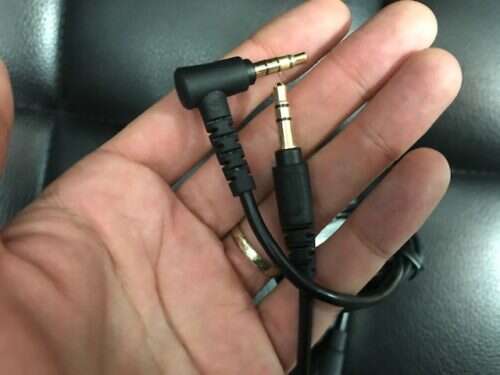
- Many JBL over-ear and on-ear models use USB-C now.
- Older or budget models may use micro-USB.
- True wireless JBL earbuds charge via a case that uses USB-C or micro-USB.
- LED indicators
- Single LED often shows charging (red) and full (green or off).
- Multiple LEDs on cases show battery level.
- Charging times
- Over-ear headphones: usually 2–3 hours to full.
- True wireless earbuds (case + earbuds): 1–2 hours for case; earbuds charge quickly inside case.
- Wall adapter vs. USB port
- Use a 5V/1–2A adapter for normal charging.
- Fast chargers can work but check your model manual.

Step-by-step: how to charge JBL headphones
Follow these clear steps for different JBL products.
For over-ear or on-ear JBL headphones
- Turn off the headphones. Off devices charge more reliably.
- Connect the correct cable to the headphone port.
- Plug the USB end into a wall adapter or a powered USB port.
- Watch the LED. Red or blinking means charging. Green or steady light means full.
- Disconnect when fully charged to avoid excess heat.
For true wireless JBL earbuds and charging case
- Place both earbuds in the charging case, properly seated.
- Close the lid if your case has one.
- Connect the case to power using the correct cable.
- Check the case LEDs: they show case level and sometimes earbud charge.
- Remove earbuds after the case shows full.
Quick tips while charging
- Use the supplied cable when possible.
- Avoid cheap or damaged cables.
- Charge in a cool, ventilated place.
- Don’t leave them plugged in for days.

Troubleshooting common charging problems
If your JBL headphones won’t charge, try these checks.
- No LED or no power
- Try a different cable and adapter.
- Clean the port carefully with a dry brush.
- Test the USB port with another device.
- Slow charging
- Use a higher-current adapter (1–2A) or a powered USB port.
- Replace frayed or cheap cables.
- Earbuds not charging in case
- Make sure earbuds sit flush in the charging pins.
- Clean contact pins with alcohol and a cotton swab.
- Reset the earbuds if your model supports it.
- Overheating while charging
- Unplug and let the device cool.
- Check for blocked vents or very warm surroundings.
From experience, small things like dust in the port or a misaligned earbud often cause most charging issues. I once spent an hour swapping cables before noticing lint blocking the contacts.

Battery care and tips to extend battery life
Good habits help your JBL headphones last longer.
- Charge cycles
- Lithium-ion batteries have limited cycles. Avoid full discharges when possible.
- Partial charging
- Frequent short charges keep battery health better than full drain cycles.
- Storage
- Store at about 40–60% charge for long-term storage.
- Keep away from extreme heat or cold.
- Firmware updates
- Install updates—manufacturers sometimes improve battery management.
- Avoid extremes
- Don’t charge in direct sun, inside hot cars, or near heaters.
Personal note: I charge my earbuds after short sessions, not only when dead. That keeps battery life steady and avoids surprises mid-day.

Safety and travel tips when charging JBL headphones
Keep safety in mind when charging at home or on the move.
- Airline and battery rules
- Most airlines require device batteries to be in carry-on. Check limits on spare batteries.
- Power banks and USB chargers
- Use quality power banks with stable output.
- Avoid unbranded chargers that can overheat.
- Charging in public places
- Use your own cable and avoid unknown USB ports to reduce risk.
- Emergency top-up
- A 10–15 minute charge often gives enough power for short use on many JBL models.

Accessories and upgrades for better charging
Small upgrades make charging easier and safer.
- Replace old cables with certified USB-C or micro-USB cables.
- Get a compact 5V/2A travel charger for faster, safe charging.
- Consider a wireless charging pad only if your JBL model or case supports Qi.
- Buy a protective case that allows charging without removing the headphones or case.

Frequently Asked Questions of how to charge jbl headphones
How long does it take to fully charge JBL headphones?
Most over-ear JBL headphones take about 2–3 hours. True wireless earbuds and their cases often charge within 1–2 hours.
Can I use any USB cable to charge JBL headphones?
You can use many USB cables, but a quality cable with the correct connector (USB-C or micro-USB) is best. Low-quality cables can cause slow charging or connection issues.
What does the LED on JBL headphones mean during charging?
A red or blinking LED usually means charging. Green, steady light or LEDs turning off often means the battery is full. Check your model manual for exact meanings.
Why won’t my JBL earbuds charge in the case?
Check that the earbuds sit correctly in the case and that the case battery has charge. Clean the contact pins and try another cable or charger.
Is it safe to leave JBL headphones charging overnight?
Occasionally yes, but avoid leaving them plugged in for days. Modern devices have battery protection, but frequent overnight charging can slightly stress battery health over long periods.
Conclusion
Charging JBL headphones is simple when you know your model, use the right cable, and follow safe charging habits. Keep cables in good shape, clean contacts, and charge in a cool place. Small habits—like partial charges and quality adapters—add up to longer battery life and fewer surprises. Try these tips today, check your model manual for specifics, and share your charging wins or questions below.